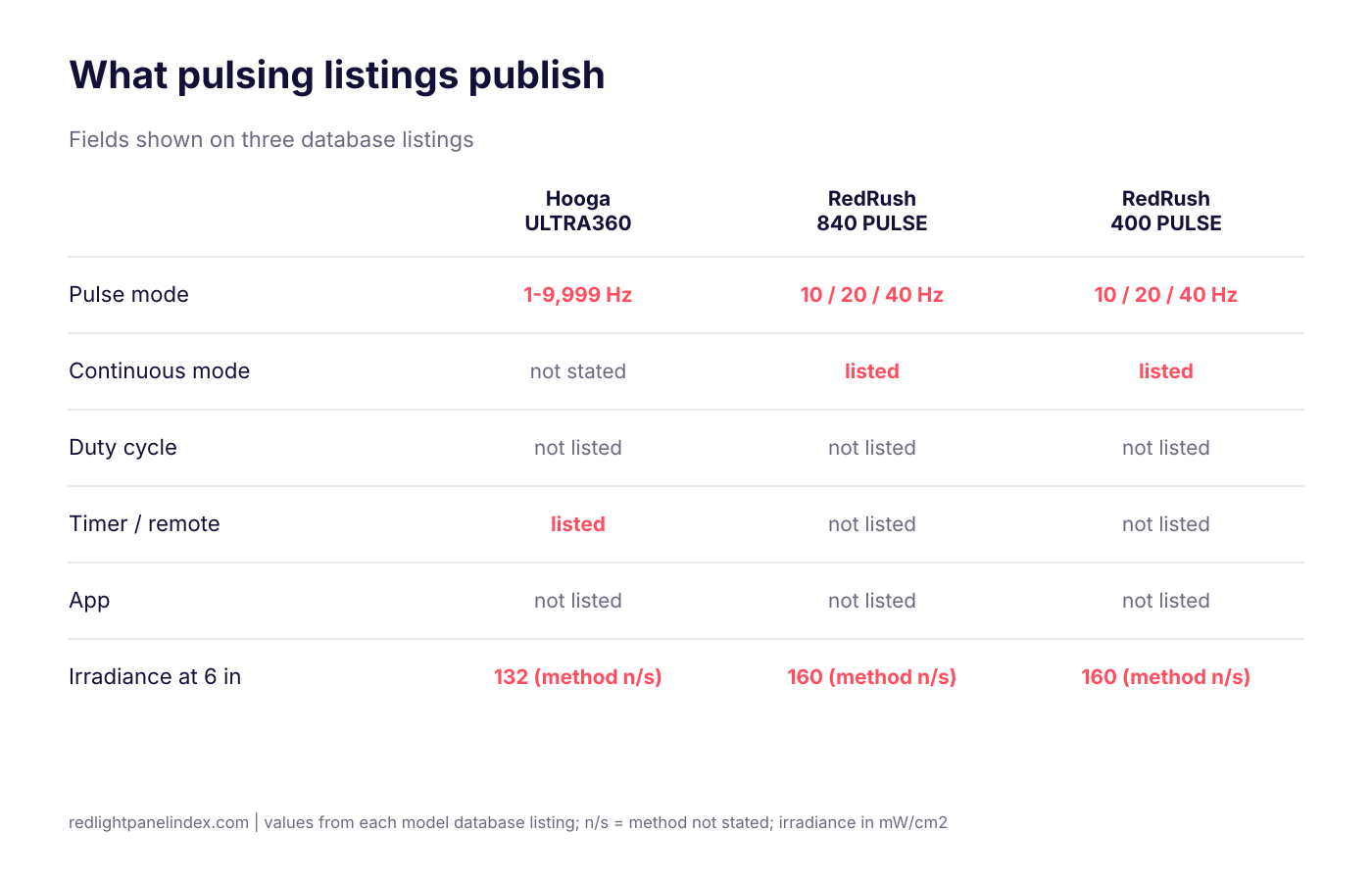
Three panels in the database publish a pulse mode: the Hooga ULTRA360, the Red Therapy Co RedRush 840 PULSE and the RedRush 400 PULSE. No listing states a duty cycle, and no listing in this set names a companion app, so the honest ranking is short and the caveats matter more than the order. Pulsing is a selectable mode, not a validated protocol, and app control is a convenience.
Choosing a panel? Our ranking of the best red light therapy panels is computed from published, method-labeled specs across 188 devices. For pulsing and app control, the spec that matters is whether the listing states average irradiance and duty cycle for the pulsed setting, because a peak figure does not give you a dose.
What the evidence says about pulsing
A 2010 review of pulsing in low-level light therapy (PMID 20662021) compared pulsed and continuous light across many studies. The site's pulsed vs continuous page summarizes the result: pulsed light did better in some comparisons, continuous light did better in others, some showed no difference, and the review identified no single best frequency or pulse structure. The review drew mostly on lasers, animal models and small human trials. It does not tell you that a pulse setting on a home LED panel improves anything.
The practical reading is this. Continuous wave remains the default for reproducing a published dose. Pulse modes are worth using only when you are following a specific protocol that calls for them. The duty cycle and pulse frequency explainer defines the two settings: frequency is how many on-off cycles occur per second, and duty cycle is the share of each cycle the LEDs are on. Average output is peak power times duty cycle, so frequency alone does not change the average.
What app control does and does not do
An app, remote or touchscreen changes how you operate the panel: timers, brightness, saved settings. None of that changes the light the panel emits. Treat these as convenience features, worth having if you will actually use them, and not a reason to pay more for a lower-output panel. Across the listings reviewed for this page, no model states a companion app. Control features that are listed are touchscreens, timers, remote sync and saved presets.
How these picks are ranked
Picks use only fields the database listing shows. Every figure below is from the listing, and each irradiance is labeled with its method as the listing labels it. For how the site scores devices overall, see how rankings work.
| Criterion | Why it is used |
|---|---|
| Published pulse modes | The only way to check that a pulse setting exists |
| Continuous mode also offered | Needed to reproduce published trial doses |
| Control features listed | Timer, brightness, remote sync, saved presets |
| Irradiance, method and distance | Sets dose; "method not stated" is a caution |
| Price and verification date | Compare on the same date basis |
| Warranty and trial | Terms if the panel does not suit you |
The picks
1. Hooga ULTRA360
The Hooga ULTRA360 lists the broadest control set of the three: a pulse mode of 1-9,999 Hz (listed for the ULTRA line), a touchscreen timer, adjustable brightness and remote panel sync. Wavelengths are 630, 660, 810 and 850 nm. Price is $399, verified 2026-09-12. Warranty is 3 years with a 60-day trial, and no restocking fee is stated.
Cautions: the brand figure is 132 mW/cm2 at 6 inches with the method not stated, and the page cites an independent spectrometer reading of about 74 mW/cm2, roughly half the brand figure. The listing does not state a duty cycle, and it does not say whether the irradiance applies to pulsed or continuous output. Use the lower measured number when you calculate a session.
2. Red Therapy Co RedRush 840 PULSE
The RedRush 840 PULSE lists selectable pulsed modes at 10 Hz, 20 Hz and 40 Hz plus a continuous wave mode, which makes it the clearest listing for comparing pulsed against continuous use. It has 280 LEDs split evenly between 660 and 850 nm. Price is $1,195, verified 2026-08-13, with a 2-year warranty and a 60-day trial. Return shipping is paid by the customer and deducted from the refund.
Cautions: 160 mW/cm2 at 6 inches is listed with the method not stated, and no timer, remote or app is listed. No duty cycle is published, so pulsed session time cannot be calculated from the listing.
3. Red Therapy Co RedRush 400 PULSE
The RedRush 400 PULSE lists the same three pulse modes plus continuous wave, the same 660 and 850 nm bands and the same 160 mW/cm2 figure at 6 inches with method not stated. It has 133 LEDs, a smaller panel, and costs $675, verified 2026-08-13, with a 2-year warranty and a 60-day trial. It ranks third because it lists fewer control features and a shorter warranty than the ULTRA360 at a price above it, with the same measurement caveat as its larger sibling.
Panels with control features but no listed pulse mode
Two other listings show control features without a pulse mode. The PowerPanel MEGA lists touchscreen control, user-savable presets and an ambient low-intensity mode, with no pulse range published on its page. The RLT Home Total Spectrum MAX lists 9 modes and states it has no companion app or internet connectivity, a privacy choice, so sessions run from the on-panel controls. Neither lists a pulse mode, so neither appears in the ranking above. RLT Home is one brand among 41 and is held to the same criteria as every other brand here.
How to read a pulsed listing
- Look for a continuous mode. Without one you cannot reproduce most published doses.
- Check whether the irradiance is peak or average, and for which setting.
- Look for a published duty cycle. For an illustrative 10 J/cm2 target at 160 mW/cm2, the site's arithmetic gives 62.5 seconds continuous, 125 seconds at 50% duty and 250 seconds at 25% duty, assuming 160 mW/cm2 is the peak. See the joules per cm2 page.
- Do not confuse pulsing with flicker, which is unintended ripple from the power supply.
- Be wary of any pulse frequency linked to a specific condition without a cited trial.
Who should pay attention to pulse modes
If you plan to follow a published protocol that specifies a pulse frequency, you need a panel that lists the frequency and a continuous option, and you need the average irradiance for the pulsed setting. If you simply want a steady dose at 660 and 850 nm, a pulse mode adds nothing you need and is not a reason to pay more. Many popular panels in the database list no pulse setting at all, and that is not a defect. The LED chip design page and the claimed vs measured page matter more to the dose you actually get than a Hz range does.
Buying checklist for control features
- Decide whether a timer, remote or touchscreen would change how often you use the panel. If it would, that is a fair reason to pay for it.
- Confirm the feature is listed for your exact model. For the Hooga line, the pulse mode, adjustable brightness and remote sync are listed for the ULTRA line only, not for the HG or PRO lines.
- Compare irradiance on the same method and distance, not on the control features.
- Check warranty, trial length and return costs before you buy.
What this page cannot tell you
No study cited here compares a home panel's continuous mode against its own pulsed mode, so no listing can be ranked on outcomes. The ranking reflects only which settings and details the listings publish. Listings change, and a model absent from this page may offer pulsing without the database showing it.